React Working
React is a component-based architecture, means you can build complex UIs by breaking them down into smaller, reusable pieces called components (aka functions). React Also allow you to change the content dynamically with ease , React give you suitable syntax to write code with usefull methods and features that can be used for Customizibilty and Optimisation of your website
Now lets keep the boring books language aside
In a nutshell 'React' is a liberary that u give you many features that is easy to use and is also mostly optimisted so we gonna learn understand it's working / features etc.
1. Components
A component is a reusable piece of code/file that we can use in our website's UI anytime and manytimes as we want ( just like a function) .
Anything that usually contribute in our scripts of the site can be called as Components it can be either a simple js file or react custom jsx file. But In react we will be writting javascript in jsx syntax because you need a jsx file to use reacts method and syntax
• Here is a simple JSX file aka Component that we can use almost everytime
Component.jsx
function Component(){
 return (
    <h1>Hello, JSX!</h1>
  )
}
export default File;
This is usually called as Functional components that are simple functions alike , so if you remove return value then it is litreally javascript function that can take argument (props) and return value (HTML) and at the end we are exporting it ,
In react we usually create multiple files so it will be more readable and customizble so we always export the function we wrote so we can use it anywhere by importing it
Now Because we create another file for our function we import function inside main.jsx .
like imagineee your html file Usually we use html file and css file and a js file to create a website in react its also same we have one html file and multiple jsx file and in the end we just import all our multiple file into html :)
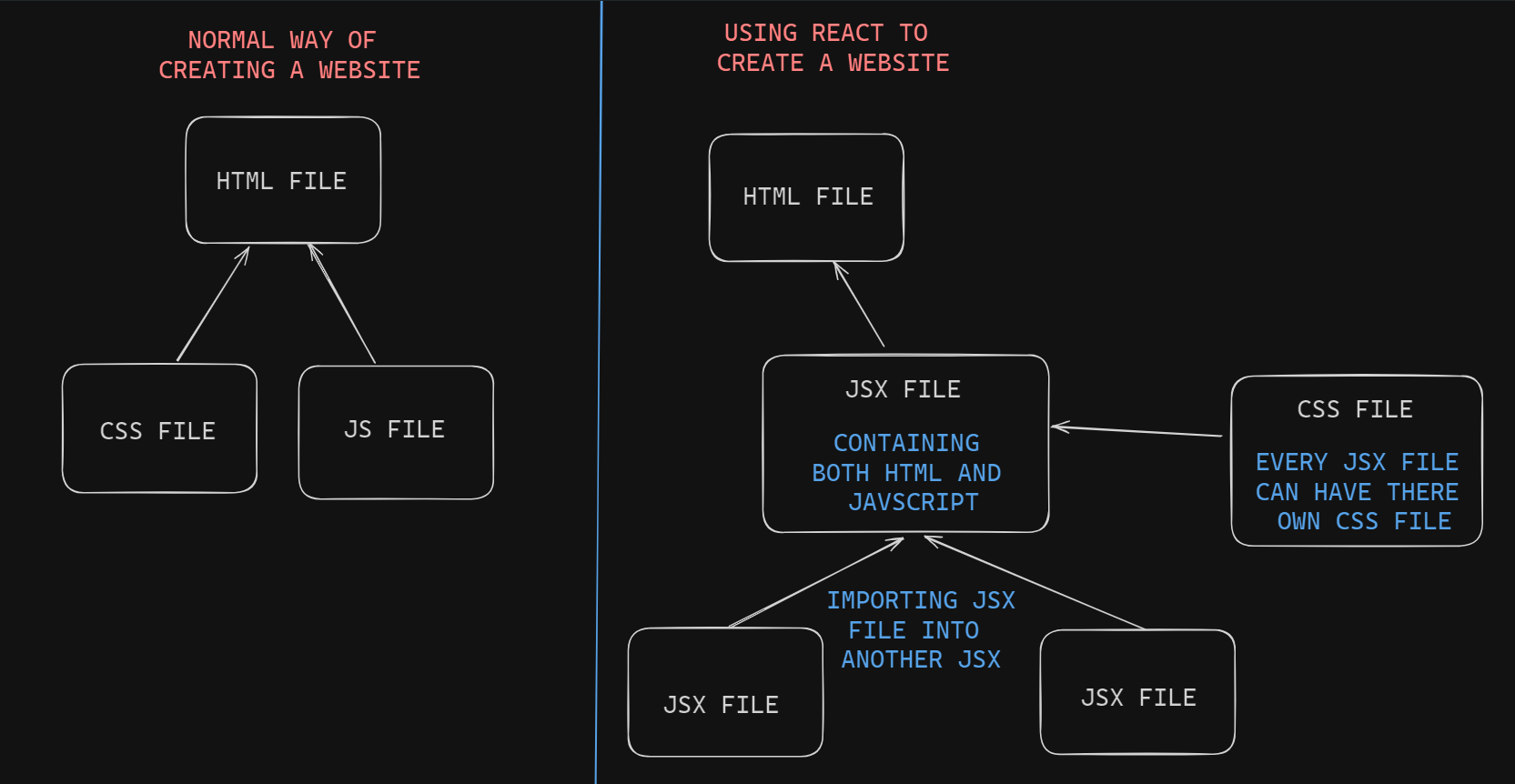
Now techically we dont import our main jsx file inside our html but our main jsx file inject itself into the html using createRoot method
main.jsx
import React from "react";
import ReactDOM from "react-dom/client" {/* We imported a react method here */}
import "./index.css"; {/* We imported css file here */}
import Component from "./Components.jsx"  {/* We imported components we create above here here */}

ReactDOM.createRoot(document.getElementById("root")).render(
  <React.StrictMode>
  <Component/>         {/* calling the Component file here instead of App */}
  </React.StrictMode>
  );
so here we see some imports above then below we see our createRoot method who's working is to inject its child(jsx file) inside the html now inject inside html
means here that we are targeting a div element (which is named as root) and inside it we are inject all our jsx file but for simplicity we call it as whole html :)
so Whenever our site will load our "component" function will get called (which is returning html), and that html will be displayed inside root element because of our "React.DOM" method we are using , u can also make a wrapper component (App.jsx) where we import all our components and after that we can import the component (App.jsx) inside "Main.jsx" , i also told this in folder structure though
2. JSX
JSX aka JavaScript XML is way of writting javascript in react Where u can return HTML directly and can use React custom methods and many more thing you cant do in javascript
But as we know , every language need a compiler to converted themself into machine language , i mean if we create a file with .nigga extension then how it gonna run or execute ? right-now we have Node.js to run javascript files but what about jsx ?
so here come "babel" , babel is a JavaScript transpiler that is used to converts JSX into JavaScript code , When you set up a React project ( using vite or CRA ), Babel automatically get configured in your project to handle JSX, When you build or run your application, Babel transforms JSX into regular JavaScript code.
So using Jsx we can write code in React's syntax which is more usefull and flexible
You can write javascript inside jsx file without any hesitation because ultimatly this (jsx) file is going to convert into javascript so how you gonna convert already present javascript ? but still there are some ristriction because react handle jsx file with there own way to make it optimisted and bug free so Things to Consider in React
2. Virtual DOM:
Virtual dom is a copy of our actual dom or can say copy of our website lying in the memory , so "this virtual dom is the main reason why you can update thing in the react dynamically without refreshing the site!" now this is what parrot people will tell you all the time
Now see you can do everything that react can do using vanilla (plain) js using some pushState() and replaceState() methods of HTML5 history API because it's javascript library and it's not like React developers have some "premium javascript" or some power so they can make so they can update the content without re-freshing the page
if u ever make some website using js , you know that your page never referesh once when u are doing something DOM manipulation using js , only manually re-directs or memory issue can cause a page referesh , React is only giving you syntactical sugar with there best optimistation they can give , so only under the hood of react is syntactic sugar and lots of optimistation , back to our "virtual DOM"
Not only react mainly nowdays most of the front-end framework use virtual dom ( a copy of actual dom/site) to update content of site optimisly , like if we have a button which is updating a number using a plain js , we would see the number updatating but under the hood browser do many operations like
document.getElementById('some-id').innerValue = 'updated value' • The browser parses the HTML to find the node with this id (Now because the site is inside browser and browser will execute the js file)
• It removes the child element of this specific element
• Updates the element(DOM) with the ‘updated value’.
• Recalculates the CSS for the parent and child nodes.
• Finally, traverse the tree and paint it on the screen(browser) display.
Now this will process will happen all the time whenever a single DOM manipulation happen
But using virtual dom , instead manipulating directly the dom, change first happen in virtual dom (it is copy of our site in the memory & is never actually rendere So changes are fast here)
So let's assume you did the same thing in react i.e. changing content inside a element
• So first react always apply changes to virtual dom (means your site is still as before nothing has changed)
• After doing changes to virtual dom , react check the difference between virtual dom and the real DOM like if there is change in a element or there is extra element react will update that afterward , this process is called "reconciliation"
Here is a example of react "reconciliation" working aka 'diffing algorithm'
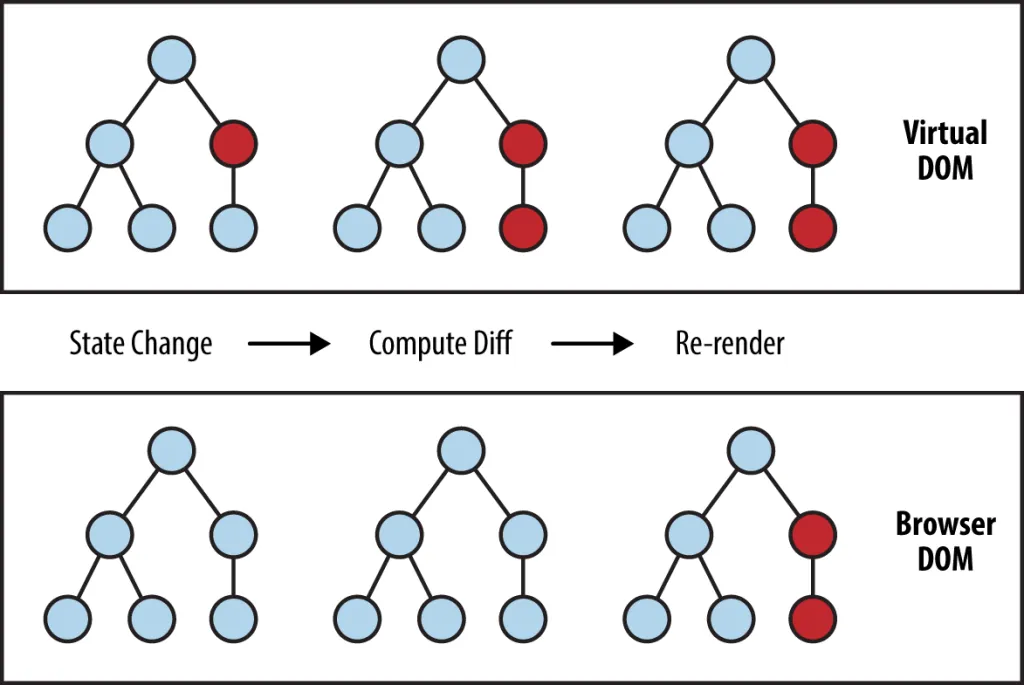
• First state (value) got changed
• second it checking the difference between real dom and virtual DOM because parent got state change that will effect the children too so whole branch will be different
• Third react update the real DOM
Still if u thinking why just manipulate the Real one ?? Isnt that easy and direct ?? At the end both are updatating Real DOM Why to add one extra step ??
The obvious reason is the optimistation , less thing to update means less load and faster page response this is all why react exist , again it's framework based on "Optimisation & syntactic sugar" and also Optimisation also done by browser like page repainting and DOM reflow but again completly different thing..
Explaning re-renders
• Dynamic changes in react is only possible using states , means to reflect vairable values as they change in your element you need to use react's state and if you ask why? because react only relies and watch his state value and parameter(of component) if only the state(or params) get change react re-renders the component which cause your element to display new value and if you use state then react don't give a fuck about your variable changing and won't do shit, this is called 'reactivity' of react अर्थात् React only react when state reacts(change)
• What is Re-render : Re-renders are just like running your function (component) again as the name says means your js code get's re-evaluate(run) but dom doesn't get change unless there is a actual change because it's the heavy thing to change everytime that's whaat react makes react (batching , smart updates) and if you ask why js get re-evalaute everytime? that's for checking params and state(value) updates making everything uptodate while because of this things you also don't need to re-evaluate everytimes get's squished but react give memeoization methods for that but now in react19 it's all automated till u follow react's rules
React keys optimisation
React also include 'Keys' and batched updates and DOM mutation techniques to minimize the number of DOM operations needed rather than manipulating the DOM one by one React applies the changes in a single batch, which reduces browser reflows and repaints
Example :
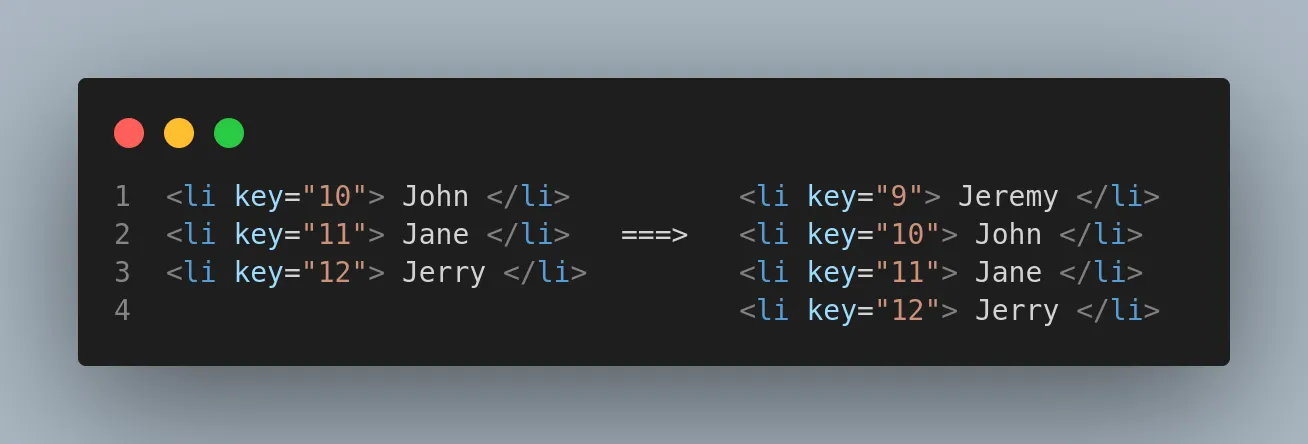
In this case where we have 3 element then if we add a new element at the top React won't re-render the whole list of items again instead It'll only render the one which was added later because of the 'key' attribute we have given , "key" is just functionality react have given us to optimise our code when you loop over elements like if you have multiple lists or elements you should always use the key attribute on elements to optimise and react will also give you warning if you don't because it helps react in optimisation
Batching in react
If ui's get update too quickly react batches them and updates at a time instead of updating each effect , Think we are updatating a value continously like a increase counter value or clicking a drop-down menu icon so fast so react will batch those increments or drop-down state (open or closed) into one batch that sometimes you will see that a 3 is going to 5/6 without going to 4 or the drop down menu isnt opening beccause u click so fast that react update the menu as closed
although you won't notice this because ui is acting as your response under the hood react skip the middle re-render & jumped to the last one reducing small loads
React Compiler
React Compiler is a new build-time tool (react 19) that automatically optimizes your React app to improve its performance, particularly on updates (re-renders). The compiler is designed to work with existing JavaScript (and TypeScript) and understands the Rules of React. If your app follows those rules you generally won't need to rewrite any code to use it. You may be familiar with memoization through APIs/Methods such as useMemo, useCallback With these APIs you can tell React that certain parts of your application don't need to recompute if their inputs haven't changed, reducing work on updates. While powerful, it's easy to forget to apply memoization or apply them incorrectly. This can lead to inefficient updates as React has to check parts of your UI that don't have any meaningful changes.
In a nutshell React Compiler will automatically applies memiozation in react components so the useMemo and useCallback and other memoized hooks will be useless as react applies them automatically
React fiber
React Fiber is an ongoing (as of 6th june 2k23) reimplementation of React's core algorithm. It's a complete rewrite of React's internal workings, for achieving
• Performance: Fiber focuses on animations, responsiveness, and smooth interactions.
• Incremental Rendering: It splits rendering work into smaller chunks, allowing React to prioritize tasks.
• Pause and Resume: React can pause work and resume it later
• Reuse and Abort: It can reuse previously completed work or abort it if unnecessary..
The name “Fiber” refers to a plain JavaScript object with specific properties that represent a unit of work in React. like each fiber or object contain some intruction to do some work that helps react to update the dom more flexibly ,like before React could not stop a work in-between, like if a Instruction is of sending xhr request to a url is send by react so react cant send another instruction (like button animation) until the xhr request is send , like a synchronous function
But after React fiber , Any instruction can be aborted or paused and after a high priorty work (like ui animation) the work can be resume , so This took lots of effort to make this kind of optimization , like react can understand the impact of a operations and can take neccesarry actions on it so user interactions will go smoothly , that's why react fiber is a great a thing react is implimenting right now